
Publication journal
See the recorded outcome before returning to a post or preparing another comment.
What it does
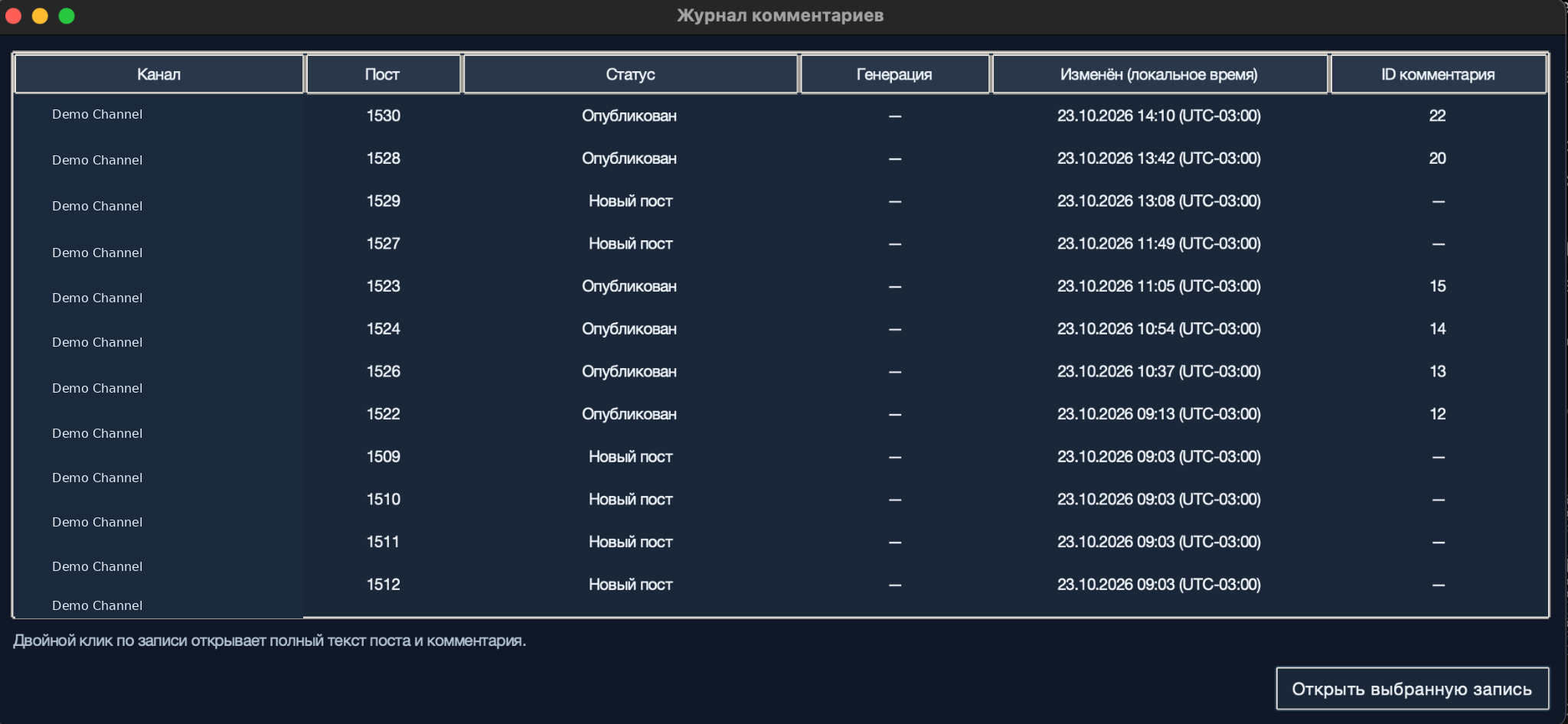
Check publication status, drafting information, update times, and published comment IDs in one table.
How it helps
Each journal entry connects a channel and post to its status, comment ID, and full text for review.
Example
Find an entry marked «Опубликован» (Published) with a comment ID. Open it to check what was published before preparing another reply.
How to set it up
Step 1 of 4
Open the journal
Select «Журнал» (Journal) in the main window. Find the channel and post number you want to check.
Step 2 of 4
Check the publication status
Read «Статус» (Status) alongside «ID комментария» (Comment ID). Published entries in the screenshot have a comment ID; entries marked «Новый пост» (New post) do not.
Step 3 of 4
Check drafting details and update time
Check «Генерация» (Generation) for any recorded drafting information and «Изменён (локальное время)» (Updated, local time) for the last recorded change. A dash means the cell has no displayed value.
Step 4 of 4
Read the full post and comment
Double-click an entry to open the full post and comment. Review the text and status before deciding whether any further work is needed.
Step 1 of 4
What to expect
You can see which comments are recorded as published and open the post and comment text for any entry.